What's New
Things move fast. So do we. Keep up to date here.
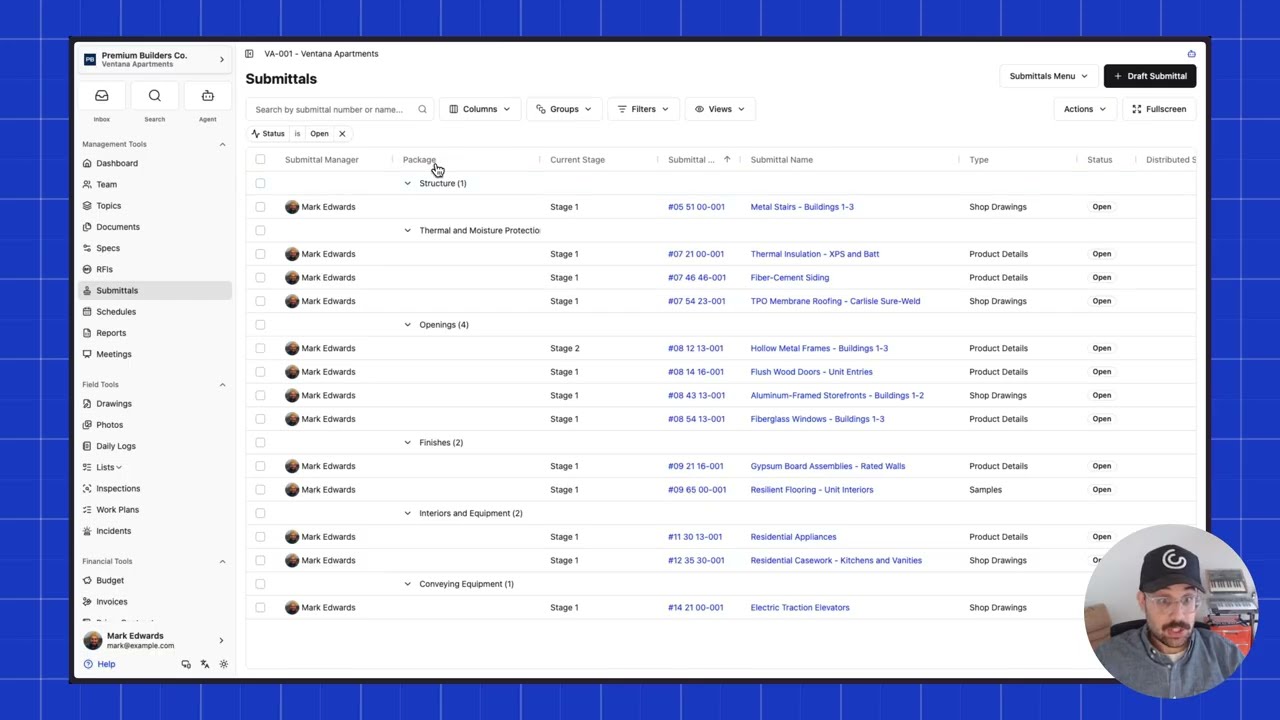
Table Views
Set a default saved view for any data grid so your team opens the same layout every time. Anyone with share access can mark a shared view as default, and everyone switches to it automatically until they make their own changes.
Custom Field Columns in Lists Reports
The Lists reports now show custom field columns across every list in the project or organization. Fields with the same key merge into one column, so filtered views and exports include the custom data your team tracks.
Search Incidents and Work Plans
Find incidents, incident records, work plans, and work plan items through project search, including their custom field values. Search results group under Incidents and Work Plans for faster navigation.
Automatic Search Updates for Custom Fields
Renaming a cost code or location now updates search results for every record whose custom fields reference it. Location label updates include descendant locations, keeping indexed labels accurate when you restructure.
Request Records on Work Plan Items
Ask performers to provide inspections, submittals, list items, photos, or documents on each work plan item. Link related records or upload attachments to fulfill requests, and see completion status on the item and in the PDF export.

Native Schedule Editing
Build and change project schedules in Constructable. Create and move Gantt activities, nest work, add milestones, and link dependencies.
Daily Log Custom Fields
Add per-project custom fields and custom sections on daily logs, and hide optional built-in fields you don't need.
Location Custom Fields
Use Location and Cost Code as custom field types so teams can pick project locations on forms.
Security Incidents
Log security incidents with a dedicated incident type and default fields.
Double-Ended Arrow Markup
Draw double-ended arrows on drawings.
Create List Items from Inspections
Turn an inspection item into a punch list item, prefilled with its title and observations.

Work Plans
Build and manage multi-week work plans with tasks, sign-off requirements, and hold points. Superintendents can plan upcoming work, track crew assignments by company, and ensure critical approvals are captured before work begins.
Callout Markup Tool
Add callout markups to drawings with text in a box and a leader arrow pointing to the target. Instead of drawing separate shapes, place a single callout that keeps the text readable and the arrow connected.
Search Drawing Contents
The Drawings search bar now filters sheets by their contents, not just sheet number and title. Search across OCR and embedded text to find the sheets you need, with results highlighted when you open them.
Manage Drawing Areas from Drawings Page
Create, rename, and delete drawing areas directly from the Drawings page. Manage your project's drawing structure without leaving the drawings workflow.
Reorder Drawing Revision Sets
Reorder published drawing revision sets when they were published out of sequence. Keep your revision history in the right order without waiting on support.
Inspection Template Library
Create reusable inspection templates at the organization level with sections, items, and response sets. Start new project inspections from any template instead of rebuilding the same inspection on every job.
Offline Drawing Downloads
Download entire drawing disciplines to your mobile device for offline access. Field crews can store full sets of sheets on their phones before heading into areas with no signal, with automatic updates when new revisions are published.
Group Drawing Review by Discipline
The drawing review page now groups sheets by discipline with bulk selection and confirmation. Confirm ready sheets in batches, see exactly which sheets need fixes, and track progress with discipline-level status bars.
Custom Fields
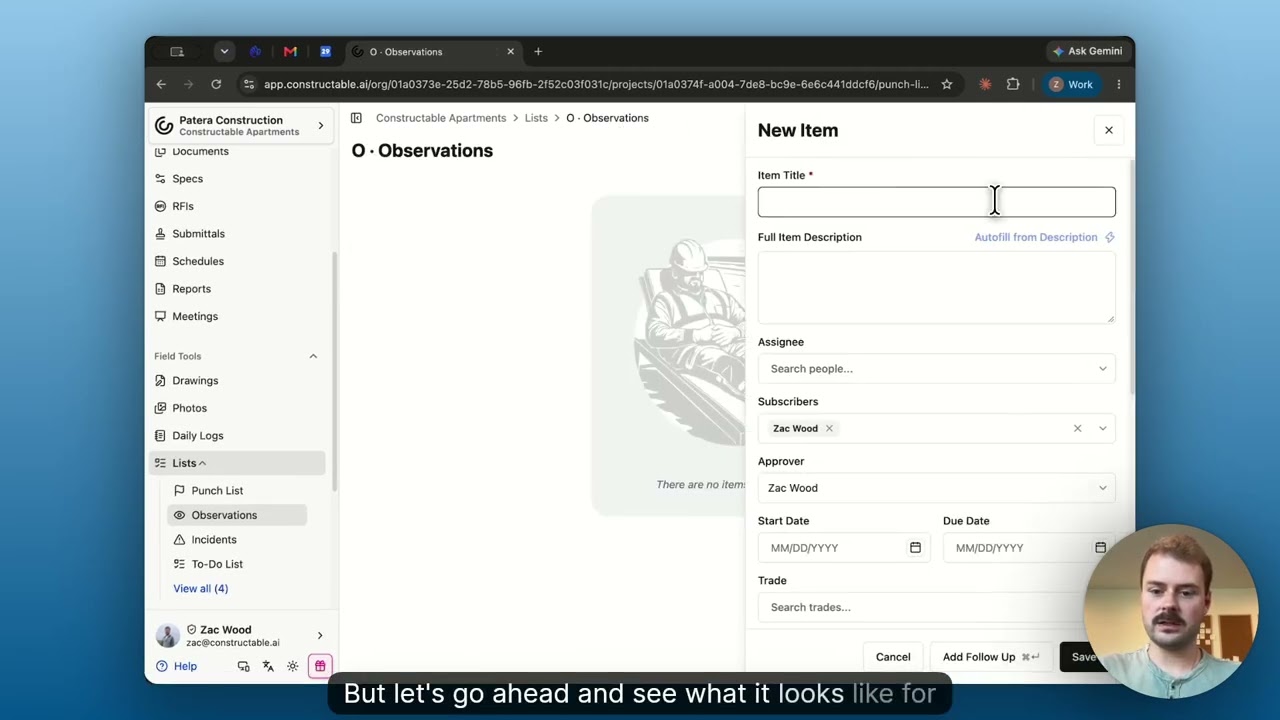
Add new custom fields to your Lists and organize them into sections. You can add text, dates, selects, people, companies, and attachments so that each List item carries the specific details your organization requires.
Incident Management
Report and close project incidents from Field Tools, with configurable incident types, injury/near-miss/property/environmental records, and shared custom field layouts.
Limited Daily Log Entry for Subcontractors
Give trade partners Limited Daily Log Entry so they can submit their own people, hours, notes, and photos without seeing the full GC daily log.
Phone Calls on Daily Logs
Log phone calls on the daily log with caller cards, optional recording and transcript, AI summary, PDF output, and an organization report.
Drawing Areas as Tabs
On projects with multiple drawing areas, switch areas from tabs under the header (with sheet counts) instead of a dropdown, including clearer mobile tab scrolling.
For Record Submittal Status
Close and distribute a submittal with the official For Record status when the owner or architect needs a set on file without a formal approval.
Faster Drawing Set Review
Large sets open for review right away by loading detections for the current sheet only, instead of waiting on every detection in the set.
Filter Drawing Sheets by Publish Status
On a drawing set, filter the sheet list to Published, Unpublished, or All so you can focus review and publishing work.

Project Info Start, Completion, and Warranty Dates
Track estimated and actual start, actual and substantial completion, and warranty start/end on Project Info, and optionally show those dates as columns on All Projects.
Create People and Companies from Project Team
Add a new person or company right from Project Team without bouncing through the directory, then set project access in the same flow.
Commitment Names on Project Team
See each company's commitment name (or trade fallback) under Project Team so field and office roles know which subcontract they are looking at without opening financials.
Color-Coded RFI and Submittal Status
Status columns in RFI and Submittal tables use color badges so you can spot draft, open, closed, and cancelled at a glance.
Company Peers See Shared Punch Items
Teammates at the same company can see and move-to-review punch items assigned to a coworker, so trade partners are not blocked when only one person was named.
Generate Drawing Revision Report On Request
The first revision report (and broken-link check) runs when you choose Generate revision report, so publishing a set stays fast until you need the report.
iOS Opens PDFs in Native Viewer
Tapping a PDF chip on iOS opens it in the system viewer instead of the in-app web view, so large files are less likely to crash the app.

Schedule Lookahead
Build and edit a multi-week schedule lookahead with tasks, crew sizes, company colors, and calendars, then export a PDF for the field. Superintendents can plan the next few weeks and hand crews a printable look ahead without leaving Constructable.
Template Projects
Mark a project as a template, then create new jobs from it with folders, cost codes, bid packages, meetings, inspections, punch lists, and team memberships already set up. New projects start from your standard setup instead of a blank job.
Custom Fields on Incidents
Add organization-defined custom fields to incidents so safety and project teams capture the details your process needs. Track the fields that matter for your company beyond the default incident form.
Stack Contract Templates for E-Signing
When preparing a commitment for e-signing, add multiple contract templates so base agreements and addenda stack in order. Use Add template on Contract Documents to append each template without wiping prior documents.
Faster SOV Import from CSV or PDF
Schedule of Values import now accepts CSV or PDF and writes large AIA G703 sheets in one pass instead of stalling after a few dozen lines. Commitment SOV import is labeled Import CSV or PDF so financial teams can load full schedules without babysitting the run.
Organization WIP Report
Organization Reports now includes a WIP Report with each project's Over Billed, Under Billed, revenue, and cost totals. Financial teams can review work-in-progress across every job without opening each project's Budget page.
Invoice Approval Workflow
Project Settings now includes Subcontractor Invoice Approvals for a sequential list of approvers. Submitted vendor invoices show an Approval workflow with Approve and Reject, and final invoice approval waits until those steps finish.
Overlay PDF Export
Sheet overlay in the drawing viewer now uses Export to PDF to download the live comparison—ghost, highlight, or red and blue—as a one-page PDF. Teams can send a revision overlay to someone who is not in Constructable.
Unexecuted Commitment Warnings
Adding a vendor change order now warns when the commitment is not fully executed, or when that vendor already has an unsigned change order. Project teams can still add the order, but they see the risk before work stacks on an unsigned subcontract.
WIP Report
The Budget page now includes a WIP Report view alongside Combined Budget and Budget vs Cost, with Over Billed and Under Billed columns plus revenue and cost percent complete. Financial teams can review work-in-progress billing by budget code and export the report as PDF or CSV.
Budget Cell Breakdown
Clicking a budget cell now opens a breakdown of the sources that make up that value, with Source, Amount, Description, and Total. Financial teams can see how a number is built—such as Prime SOV, Vendor Change Order, or Budget Modification—without leaving the grid.
Certificate of Insurance Review
Organization Settings now includes a Certificate of Insurance section for a Review prompt and Notify organization users. Uploaded certificate PDFs can be checked against that prompt, and insurance attachments show Passed Review, Under Review, or Failed Review so teams can follow up without opening every file.
Agent Fullscreen
The Agent side panel on desktop now includes Expand panel to work fullscreen, with Exit fullscreen to return to the split view. Teams can give a chat the full window when reviewing a long answer, then go back to the page they were on.
Find Discrepancies
The Agent now includes a Find discrepancies skill that checks published drawings and specs for material conflicts. Project teams can start that review from Use a Skill instead of describing the scan from scratch.
Quantity and Unit Price on Line Items
Change order and SOV line items now include Qty, Unit, and Unit Price, with Amount calculated automatically. Financial teams can price unit-based work in the grid and on change order PDFs, and leave quantity blank for lump sum.
Custom Agent Skills
Teams can now create Custom Skills in the Agent and share them with the organization or keep them private. Repeatable prompts start from Add/Edit Custom Skills instead of rewriting the same instructions each time.
Drawing Revision Changes
Publishing a revised drawing set now generates a Revision changes briefing on Drawing Sets. Teams can open View revision changes to see what changed on each sheet, related records, and Broken detail links without comparing the set by hand.
Contract Merge Fields
Place Signature Fields now includes Merge fields that fill from project, organization, commitment, and signer data when a contract is sent or downloaded. Teams can stamp values like Project Address and Signer Name onto the PDF instead of typing those blanks by hand.
Bid Package Downloads
Bidding Resources now includes View Specs and Download All for a ZIP of drawings, specs, documents, and photos. Invited bidders can review the package in Constructable or download the full set without collecting files one by one.
Drawing Details
Drawings now include a Details tab that lists detected details from published sheets. Teams can filter by number or title and open a detail on the sheet without scanning the full set.
Folders With Files at a Glance
Document folders that contain files now show a filled folder icon, while empty folders stay outlined. Teams can see which folders have documents without opening each one.
Change Events Index
The Change Events page now includes tabs for Change Events, Prime Change Orders, and Vendor Change Orders, with a card view for events that shows prime, budget, and expense totals. Project teams can review event-level impact and manage each order type from one page.
Executed Change Order PDFs
Executing a change order now locks the PDF to a snapshot of line items, amounts, and previously executed totals at that moment. Later edits no longer change the executed document or the net change shown on later change order PDFs.
Budget vs Cost Report
The Budget page now includes a Budget vs Cost view alongside Combined Budget, with dedicated columns for budget, vendor commitments, and costs. Financial teams can compare original and revised budget against committed and actual spend without wading through revenue columns.
Daily Log Safety
Daily Logs now include a Safety section for notes and attachments, and organizations can turn the section on or off in Daily Log settings. Field teams can record safety notes and photos on the log, and the section is included in Daily Log PDFs and reports.
PDF Text Selection
Drawings and PDFs now include a Select text tool for highlighting and copying text from the page. Teams can pull notes, spec language, or sheet callouts without retyping from the viewer.
Company Merge
Organization admins can now merge duplicate companies from the Global Directory, combining people, commitments, insurance, bids, and related records into one company. Teams can clean up directory duplicates without waiting on Constructable support.
Organization Time Cards
Organizations can now track employee hours with Time Cards at the organization level, including line items by project, cost code, and rate. Field teams can add and edit time cards from the Daily Log without leaving the log, and admins can optionally sync qualifying hours into Non-Committed Costs.
Daily Log Distribution
Daily Logs can now be distributed and redistributed with a guided workflow for photo options, recipients, and email review. Projects can set default recipients so field updates reach the right people without rebuilding the handoff each time.
Bulk Document Deletion
Documents can now be selected and deleted in bulk, with delete controlled separately from document write access. Teams can clean up files and folders faster while limiting who is allowed to remove them.
All Lists Report
Organization reports now include an All Lists view across every project. Teams can group and filter list items by project, list, status, assignee, trade, and location to see punch and inspection work company-wide.
Selective Change Order Markup Compounding
Vertical prime change order markups can now compound on a chosen subset of prior markups—for example applying GL to costs and Profit while excluding Overhead. Financial teams get more precise markup stacking without workarounds.
Chat with the Contract
Fully executed, Constructable e-signed commitments now offer a Chat with the Contract skill that scopes the AI agent to the signed contract PDF. Teams can ask questions about the executed agreement without leaving the commitment page.
Drawing Blend Mode on Mobile
Mobile devices can now open blend mode between revisions of the same drawing sheet. Field teams can compare sheet revisions on phone or tablet without switching back to desktop.
Meeting Minute Distribution
Meetings can now be distributed and redistributed with a guided workflow for attachments, recipients, and email review. Teams can send meeting minutes to the right people, track what was distributed, and redistribute updates without rebuilding the handoff from scratch.
Photo Date, Time, and Location Captions
Organization admins can now enable date, time, and location captions for newly uploaded project and Daily Log photos from Photo Settings. Field photos can carry capture context on the image itself, so documentation stays clear outside Constructable.
AI Agent Skills for Bids, Invoices, and Submittals
The AI agent now offers focused skills—including Import bid, Import invoice, and PreCheck—with skill chips and context about where you are working. Teams can start structured AI workflows from chat or related pages instead of describing every step from scratch.
Drawing Markup Style Controls
Drawing markup tools now share consistent thickness, color, and opacity controls, with opacity saved on shapes. Markups stay visually consistent across tools and easier to tune for review.
Pin Photos to Plans
You can now pin photos directly onto drawing sheets from the drawing viewer. Teams can take new photos or choose existing ones, open the linked sheets from a photo, and keep field documentation tied to the exact place on the plan.
Contract Approvers
Contracts can now require approvers before signers are invited. Teams can configure who must review and approve, track approval status, and keep signing from starting until every required approver has signed off.
AI Agent Side Panel
The AI agent is now available in a side panel while you work, with an inbox-style chat list for switching between conversations. Teams can ask questions and keep project context open without leaving the page they are on.
Dedicated Project Team Page
Project Team now has its own sidebar page instead of living inside the project dashboard. Teams can manage companies and people from a focused team view, while the dashboard stays centered on project status and work at hand.
Text Color in Rich Text
Rich text editors now support text color, including options for gray, red, orange, yellow, green, blue, purple, and pink. Meeting notes and other formatted fields can highlight key points without relying on bold or italics alone.
Lien Waivers for Prime Invoices
Prime invoice submissions can now create and send lien waivers using organization signers. Owner billing teams can generate the right waiver from a prime invoice without relying on vendor company contacts.
Bulk Document Actions and Shareable Downloads
Documents can now be selected in bulk to download, move between folders, or package into a named ZIP with a shareable link. Teams can organize and hand off groups of files without repeating the same action one row at a time.
Expanded Closeout Packages
Closeout packages are now available from Project Settings and include prime and vendor commitments and invoices alongside documents, drawings, specs, and field records.
Purchase Order Legal Language
Organizations can now maintain separate legal language for purchase orders and vendor contracts. New purchase orders use the PO-specific terms above the Schedule of Values, so each agreement gets the right language without manual edits.
More Size Options for Company Logos
Organizations and companies can now upload logo formats tailored for square and rectangular placements. Constructable uses the right logo throughout the app, reports, PDFs, and directory views, keeping company branding clear and consistent.
Closeout Packages
Closeout packages are now available from the Closeout feature. Teams can select the data types they want to include and generate an official closeout package .zip file with a single click.
Document Links and Downloads
Documents can now be opened from direct links and shared with other users who already have access. Teams can copy a link to a specific file or folder, see file sizes in the table, download from row actions, and rename folders without losing their place.
RFI Distribution Workflow
RFIs now close and distribute with a guided workflow similar to submittals. Teams can choose question and response attachments, pick recipients, review the email, and redistribute closed RFIs with a clear record of what was sent.
External Draft RFI and Submittal Workflows
Projects can now let external collaborators create limited draft RFIs and submittals. Default managers keep new drafts routed to the right person, and managers get notified when a subcontractor starts a new RFI or submittal draft.
Submittal Revision Rows
Submittal tables now include revision rows and a current-revision filter. Teams can review historical revisions when they need the full record, or filter back to only current revisions for a cleaner working list.
Budget Report Improvements
Budget reports now support including or excluding pending change orders from totals, with excluded values shown in italics when active. Teams also get Budget Code labels, fewer unnecessary zero cells, and a tighter layout for reviewing more financial detail with less noise.
Custom Payment Application Views
Subcontractor pay applications can now be customized before export. Teams can choose the columns and line item details they need, save the view for reuse, and generate cleaner payment application PDFs for owner, lender, or internal review.
Saved RFI and Submittal Grid Views
RFI and submittal tables can now save customized grid views. Teams can keep the filters, columns, and layout they use most often, then return to that view instead of rebuilding the same table setup each time.
Actual Costs Report
Projects now have an Actual Costs Report for subcontractor invoices and receipts. Teams can review actual cost activity by company, source, status, cost code, date, or month, making it easier to understand where posted costs are coming from.
Improved Schedule Gantt View
Schedule Gantt views now have clearer controls for columns and zoom levels, with smoother rendering for large schedules. Teams can move between hour, day, week, month, and year views to review schedule detail at the right level.
Spec Book Downloads
Spec books can now be downloaded directly from the spec viewer. Teams reviewing specifications can keep a local copy, share the full book outside Constructable, or hand off the original document without leaving the spec review workflow.
Budget Grouping by Cost Code
Budget reports now separate the default Cost Code + Cost Type grouping from a Cost Code-only view. Teams can switch to the level of detail they need, making it easier to review budgets with or without cost type breakdowns.
Attach Existing Photos to Punch List Items
Punch list items can now attach photos that already exist in Constructable. Teams can reuse project photos from the media picker, keep issue documentation connected, and avoid downloading and re-uploading the same field images.
Submittal Template Submission Stages
Submittal approval templates can now include a request submission stage. Teams can save templates that start with contractor submission and then continue into the approval workflow, keeping repeated submittal setup closer to the way the work actually flows.
Expanded Email Activity Tracking
Email Activity now captures more Constructable-sent emails, including contract emails, with searchable delivery status, sender, recipient, and project details. Teams can audit email history from one report instead of checking individual records one at a time.
More Granular Commitment Permissions
Commitment permissions are now split more clearly across prime contracts, vendor commitments, change events, and change orders. Organization admins can tune role access around the financial work each user should see or update without relying on one broad commitment permission.
Publish and Unpublish Schedules
Schedules can now be published and unpublished. Only user roles with access to create and update schedules can view unpublished schedules, so teams can prepare schedule changes privately and share them when they are ready.
Improved View of User Roles and Permissions
Organization admins now have a grid-based permissions view for roles, making it easier to see how user roles compare for each permission.
Schedule Notifications
Schedules now support project notifications. Teams can subscribe to new schedule updates, follow published and archived schedule activity, and jump back to the right schedule from their notification feed instead of checking the schedule manually for changes.
In-App What's New page
Constructable now has a What's New page inside the app. Users can review recent product updates from the main menu to see which updates are new to them and open the public What's New web page to review all prior releases.
Attach Existing Photos to RFIs
RFIs can now attach photos that already exist in Constructable. Teams can pick project photos from an album-style selector, include them in RFI descriptions or responses, and review image attachments as thumbnails without re-uploading files.
Bid Invite Magic Links
Bid invitations now use magic links to bring bidders directly into the right bid package. External bidders can open their invite, complete any required verification, and land in the bidding workspace with less sign-in friction.
Bid Management Grouping and Activity
Bid package views can now be grouped by scope or trade, making large bidder lists easier to review. Received bids also surface latest activity so teams can spot recent bidder updates and prioritize follow-up faster.
Submittal Approval Templates
Projects can now save reusable approval templates for submittals. Set up stages, approvers, due day defaults, and approval requirements once, then apply the template to draft submittals instead of rebuilding the same workflow each time.
Drawing-Linked Submittals
Submittals can now be created and reviewed directly from the drawing viewer. Teams can pin submittals to plan locations, switch between draft, open, and done submittals on a sheet, and keep submittal context tied to the drawings it affects.
Submittal Distribution Controls
When closing and distributing a submittal, teams can now choose recipients, review attachments, edit the notification email, or close without sending an email. The distributed submittal keeps a record of the message when one is sent, making the closeout trail easier to review.
Project Dashboard Notes
Project dashboards now include a rich text notes block. Teams can keep high-level reminders, project context, or internal notes visible from the dashboard instead of tracking them separately.
Celsius Weather Display
Users can now choose Fahrenheit or Celsius for weather values in their personal settings. Daily logs, weather reports, and dashboard weather cards will follow that preference, making project weather easier to read for every team.
Bulk Create Submittals from Specs
Spec sections can now be selected and turned into submittal drafts in bulk. Teams can choose the package, responsible contractor, manager, subscribers, and approval workflow once, then create a batch of draft submittals ready for review.
Email Activity and Editing
Project emails now use a consistent in-app editor, and sent email history can be reviewed from a new Email Activity report. Teams can adjust recipients, subject, body, merge fields, and attachments before sending supported emails, then audit what was sent later by date range, sender, recipient, subject, or project.
Drawing Index Return State
Drawing lists now remember where you were when you open a sheet and come back. Search text, expanded disciplines, view mode, and scroll position are restored so teams can review large drawing sets without losing their place.
Submittal Numbering Controls
Projects can now customize how submittal numbers and revisions appear. Teams can choose whether to show spec section numbers, use numeric or lettered revisions, and decide whether the original submittal starts at the first revision.
Flexible RFI Status Changes
RFIs can now be moved between Draft, Open, and Closed without running the full open, distribute, or close workflows. This gives teams a faster way to clean up status mistakes or close simple RFIs while keeping the formal workflow available when it is needed.
Sign Commitments from the Commitment Page
Subcontractors can now review and sign commitment documents directly from the commitment page when it is their turn to sign. The contract status block shows the next signing action in context, reducing the need to hunt through email links.
Broader Project People Selection
People with project access now appear in assignment, subscriber, approver, and mention pickers even if they were not manually added to the project team. This makes it easier to include organization-level users who can already view the project.
Directory Notes
People profiles in the global directory now include general notes. Teams can capture internal context about organization members or company contacts directly on the person's profile, keeping important relationship details easy to find.
Connect AI Tools to Constructable
Users with MCP access can now connect approved AI clients to Constructable and review which organizations the client can access before completing the connection. Access follows live Constructable permissions, including read and write capability by organization.
Takeoff PDF and CSV Exports
Takeoffs can now be exported as PDF or CSV files. Teams can share measured quantities, categories, and supporting drawing context outside Constructable for estimating, review, and handoff.
Bulk Subcontractor Pay Application Downloads
Subcontractor pay applications can now be downloaded in bulk by billing period. Instead of opening each invoice one at a time, teams can generate a package of pay application PDFs with the related attachments and lien waivers.
Better Commitment Invoice Visibility
Commitments now show more invoice context, including total invoiced and remaining retention. The invoices block is also easier to scan, helping teams understand payment progress without leaving the commitment.
Clearer Invoice Import Tracking
Invoice import runs now show the company, total amount, and billing period for each upload. This makes it easier to review imported invoices, spot the right run, and follow up when a batch needs attention.
Drawing Area Deletion
Drawing areas can now be deleted from project settings when they are no longer needed. Teams can clean up outdated or accidental drawing areas without asking support to remove them.
AI Invoice Imports
Invoice PDFs can now be imported in bulk and reviewed in a dedicated invoice import workspace. Teams can upload invoice files, track each import's status, chat through needed corrections, and jump straight to the generated invoice submission when it is ready.
Costs Report
Projects now have a dedicated Costs Report that brings SOV lines, change order costs, and receipts into one filterable view. Teams can group costs by month, company, source, status, or cost code and export the report for review.
RFI Pins in Drawing Exports
Drawing PDF exports can now include RFI pins along with other markups. This keeps exported plan sheets connected to the field questions and coordination items that matter during review, sharing, and closeout.
Custom User Roles
Organizations can now create custom roles with tailored permission sets in addition to the default roles. This gives teams more control over who can access, edit, approve, and manage work across their projects.
Drawing Discipline and Sheet Reordering
Drawing disciplines and sheets now have a dedicated reorder experience. You can reorganize disciplines, move sheets within a discipline, and drag sheets between disciplines to keep plan sets structured the way your team works.
Daily Log Bulk Export
Daily logs can now be exported in bulk from project settings. Instead of downloading reports one day at a time, teams can generate a larger daily log package for closeout, owner reporting, or internal recordkeeping.
Group the Budget by Cost Code Tiers
The budget can now be grouped by parent cost code tiers, making it easy to roll up your budget by division or subdivision.
Approve Invoices Straight from Drafts
Invoices can now be approved directly from draft when the reviewer has approval permission. This removes an extra workflow step for teams that are ready to approve an invoice without first moving it through a separate review state.
Track Prime Contract Legal Name and Address
Prime contracts now have an optional legal name and address for cases where it differs from the company's general name and address. If set, it will be used on lien waivers, change orders, and pay applications.
Download Documents Ahead of Signing
Contract signers can now download the prepared document package before signing, making it easier to share or review the documents before they complete their signature.
Drawing Tags
You can now tag drawings and filter by those tags in both the drawings index and viewer. Tags make it easier to organize large drawing sets, jump to the sheets you need, and keep related plan pages grouped across your project.
Faster Mobile App Performance
Drawing and plan viewing on mobile is now significantly faster and more responsive. We've optimized how drawings are rendered on your device, reducing wait times when viewing project plans in the field.
Mobile Push Notifications
Android users now receive real-time push notifications for project updates, messages, and approvals. Stay connected to your projects even when the app isn't open.
Faster Drawing Performance
Drawing sheets now load significantly faster, especially when working with large sets of drawings. The app also uses less memory when viewing drawings with lots of markups and annotations.
Contract Document Access
Signed contracts now include a direct download link for easier access. Change order attachments are also automatically included in your contract documentation package.
Equipment Hours Flexibility
Daily log equipment entries now allow zero hours to be recorded. This makes it easier to track equipment that was on-site but not actively used during a particular day.
Equipment Tracking in Daily Logs
You can now track equipment usage directly in daily logs, including hours, operator details, and equipment-specific notes. This data appears in your daily log summaries and PDF exports, giving you better visibility into equipment utilization across your projects.
Selective Daily Log Photo Access
Organizations can now control which users have access to daily log photos through new permission settings. This gives you better control over sensitive project documentation.
Faster Invoice Status Updates
Invoice status changes now happen instantly while the update syncs in the background. No more waiting for the server when you submit, approve, or mark invoices as paid, even with slow network connections.
Materials Tracking in Daily Logs
Daily logs now include a dedicated Materials section where you can track materials used on site. You can also repeat materials from the previous day's log to save time on data entry.
Quality List Templates
New quality list templates let you create standardized punch lists, observations, and inspection checklists. This ensures consistency across projects and saves time setting up quality control processes.
Sage Intacct Purchase Order Sync
Purchase order change orders now sync automatically to Sage Intacct, extending the existing integration to cover all commitment types. This eliminates double data entry between Constructable and your accounting system.
Quick Add Punch Items from QR Codes
Scan location QR codes to instantly add punch list items without navigating through menus. This saves time during walkthroughs and ensures items are logged in the correct location right away.
Better Budget Management Tools
You can now upload budgets and cost code forecast override notes are included in the budget report.
Bulk Distribution Scope Editing
Edit scopes for multiple bidders at once from the Distribution tab in Bid Management. This saves significant time when making assigned Scope changes across many bidders in larger bid packages.
Enhanced Drawing Markup Tools
The drawing viewer toolbar is now available on tablets and desktops for non-measuring tasks. You can also edit who topics are shared with and rename them directly in the viewer, making collaboration smoother.
Video Support in Photos and Daily Logs
You can now upload and view videos in your photo galleries and daily logs, not just images. This makes it easier to document complex issues or progress that requires motion to understand properly.
Rich Text Photo Descriptions
Photos now support detailed rich text descriptions that appear above the comments. Add formatted notes, context, and detailed explanations to make your visual documentation more informative and searchable.
Faster Keyword Search Results
Search results now appear instantly as you type, using optimized full-text search technology. Finding drawings, RFIs, and other project documents is now significantly faster across all project content.
Improved Project Team Table View
The project team page now includes a new table view with collapsible sections and better data organization. Team member information is easier to scan and manage, with view preferences that persist between sessions.
Introducing the Project Dashboard
The brand new Project Dashboard is here. See all your ball-in-courts and all your notifications in one place, plus manage which notifications are read and unread. See documents requiring your signature in one block so you can jump straight to signing. Get a context-rich summary of the last 3 Daily Logs, and view their photos right on the dash.
Add Users to Project Team Without Providing Project Access
Now you can add users to the Project Team without immediately giving them access to the project, with the option to give them access later if desired.
Meeting Minute PDF Export Options
When you export meeting minutes to PDF, you can choose whether to include prior meetings' notes and how many to include. Your preference is remembered for next time.
Organization-Wide Invoices Report
View all invoices across every project from a single report at the organization level. Filter, sort, and get a complete picture of your billing status without jumping between projects.
Lien Waiver PDFs
Generate and download professional lien waiver PDFs directly from Constructable. Conditional and unconditional waivers are formatted and ready to print, sign, and file.
Search for Change Events and Change Orders
Change events, change orders, and drawings are now included in search results. Find the CO you're looking for by number, title, or description in seconds.
Lien Waivers
Create, track, and manage conditional and unconditional lien waivers directly in Constructable. Generate waivers tied to your payments and keep every waiver organized in one place. No more chasing paper.
AI Assistant Chat with Question History
The AI assistant now supports a conversational chat interface. Ask follow-up questions naturally, and review your full history of past questions and answers anytime you need to revisit something.
Revenue Codes for Financial Reporting
Define revenue codes separately from cost codes to track income and expenses on different dimensions. Map revenue codes to your Sage Intacct accounts for accurate financial reporting that matches your accounting structure.
Contract Generation with Legal Language
Generate prime and vendor contracts with standardized legal language and customizable open-text merge fields. Produce professional, ready-to-sign PDFs directly from your commitment data.
E-Signing Templates, CC Recipients, and Custom Emails
Create reusable e-signing templates to standardize your contract workflows. Add CC recipients so stakeholders stay informed, and customize the notification email your signers receive.
Insurance Tracking on Commitment Contracts
Collect and track insurance certificates as part of your commitment contract workflow. When you send a contract for signing, you can now require the subcontractor to submit their insurance documentation as part of the process.
AI Deep Research Mode
Ask a complex question about your project and the AI assistant will conduct a multi-step investigation across your documents, drawings, RFIs, and submittals before answering. Get thorough, well-sourced answers to questions that span multiple areas of your project.
Bulk Download RFIs and Submittals
Download all RFIs or all submittals at once from the settings dropdown. Whether you need a complete set for a meeting, an audit, or a closeout package, it's one click instead of one-by-one.
Smoother Drawing Viewer Performance
The drawing viewer now uses progressive HD tile loading for clearer sheets at every zoom level, with steadier frame rates even on complex drawings with lots of markup.
Electronic Signatures for Contracts
Send contracts for e-signature directly from Constructable. Preview the document, place signing blocks, and route it to the right parties. No third-party signing tool required. Contracts get signed faster and everything stays in one place.
Meeting Minutes Carry Forward Previous Notes
When exporting meeting minutes to PDF, notes from prior meetings are now included automatically. This gives everyone the full context without having to flip through past meeting exports.
Apple Pencil Support and Drawing Export Improvements
Apple Pencil now works properly on iPad for drawing markup. We've also improved export behavior so all markup appears in your exported drawings, regardless of where you trigger the export.
QuickBooks Integration v2
Our QuickBooks integration has been completely overhauled for reliability and speed. A new company aliasing feature lets you mark duplicate companies as aliases so they sync to the correct QuickBooks vendor. No more duplicate entries.
Downloadable QR Codes for Field Locations
Generate and download QR codes for any location on your project. Print them and post them on site so field teams can quickly pull up punch lists, inspections, or other location-specific items by scanning with their phone.
Reminder Notifications and Auto-Close Submittal Revisions
Send reminder notifications to keep pending items moving. On the submittals side, previous revisions now automatically close when a new revision is created, keeping your log clean and your team focused on what's current.
Sage Intacct Cost Code Syncing
Cost codes now sync bidirectionally with Sage Intacct. When you add or update cost codes in either system, the changes flow automatically, keeping your project accounting and your ERP in lockstep.
Yard Measurements for Takeoffs
Area measurements now support square yards in addition to square feet. Select the unit that matches your specs and get accurate quantities without manual conversion.
Inline Cost Code Editing
You can now change the cost code on existing line items, budget rows, and other records without recreating them. Just click, select the new code, and save.
Quality Lists
A brand-new module for tracking quality checklists and inspections on your projects. Create lists, assign items, and ensure quality standards are met across every trade, on desktop and mobile.
Auto-Calibrate Scale on Drawings
When working with takeoffs, Constructable can now automatically detect and calibrate the scale on your drawing sheets. No more manual scale entry. Just start measuring.
Organization-Wide Cost Codes
Define cost codes once at the organization level and control which ones are available on each project. Manage, archive, and organize your cost code library from a central settings page, with full support for hierarchical structures.
Create Commitments Directly from Received Bids
When you receive bids, you can now bulk-create commitments in one step. Select the bids you want to award and Constructable generates the commitment records automatically, saving time and reducing manual entry.
Payments Tracking
Track payments against your commitments and invoices. Record payment amounts, dates, and methods, and link them to the right line items so your financial picture stays accurate and up to date.
Search Now Covers All Attachments
Search results now include documents, photos, and every other attachment type in your project. Combined with AI-powered question answering, you can ask natural language questions and get answers grounded in your actual project data.
Completely Rebuilt Search
Project-wide search has been rebuilt from the ground up. Results are faster, more accurate, and now support exact phrase matching. Whether you're looking for a specific RFI, a submittal, or a drawing, search gets you there in seconds.
Punch List Filtering and Bulk Actions
You can now filter punch lists by status, assignee, location, and more on both desktop and mobile. Bulk actions let you update multiple items at once, and the download options are consolidated into a single dropdown.
Smarter Drawing Sheet Links
Our automatic sheet-to-sheet linking is now significantly more accurate. When your drawings reference other sheets, Constructable matches them correctly — even when text overlaps or non-standard naming conventions are used.